Tracking and measuring the revenue generated from email marketing campaigns is crucial for optimizing performance and maximizing ROI. Advanced email revenue metrics go beyond basic open and click rates to provide deep insights into subscriber behavior, conversion funnels, and attribution models. In this comprehensive guide, we'll dive into the key metrics, tools, and strategies for implementing advanced email revenue tracking systems that deliver actionable data and drive business growth.
Understanding Email Revenue Attribution Models
Email revenue attribution involves assigning credit for conversions and revenue to specific touchpoints in the customer journey. There are several common attribution models used in email marketing:
First-touch attribution gives 100% of the conversion credit to the first email interaction in the subscriber's journey. This model emphasizes the importance of initial engagement but may overlook the impact of subsequent touches.
Last-touch attribution assigns all credit to the final email interaction before conversion. This model prioritizes the email that directly led to the desired action but ignores the influence of earlier touchpoints.
Linear attribution evenly distributes credit among all email interactions in the conversion path. Each touchpoint receives equal weight, acknowledging the collective impact of the email sequence.
Time-decay attribution assigns more credit to email interactions closer to the conversion event. Touchpoints further back in time receive progressively less credit, reflecting the diminishing influence of older interactions.
The choice of attribution model depends on your business goals, customer journey complexity, and the role email plays in your overall marketing mix. Consider testing different models to find the best fit for your unique scenario.
Implementing Advanced Email Tracking
To accurately measure email revenue, you need a robust tracking system that captures subscriber interactions and ties them to downstream conversions. Here's a step-by-step guide to implementing advanced email tracking:
-
Add Unique Tracking Parameters
Include unique tracking parameters in your email links to identify the specific campaign, email and link. Use a consistent naming convention for easy analysis. If you need to tie clicks to individual subscribers, use an internal ID rather than an email address, since analytics tools such as Google Analytics prohibit sending personal data in URLs.
https://www.example.com/offer?utm_source=newsletter&utm_medium=email&utm_campaign=spring_sale&utm_content=hero_image -
Implement Click Tracking
Set up click tracking to capture subscriber interactions with email links. Use a reliable email service provider (ESP) or marketing automation platform that offers built-in click tracking functionality.
Tip: Ensure your tracking links are properly formatted and compatible with your ESP's tracking system. -
Integrate with Web Analytics
Integrate your email tracking data with web analytics platforms like Google Analytics or Adobe Analytics. This allows you to follow the subscriber journey beyond the email click and tie email interactions to on-site behavior and conversions.
This is how email tracking and web analytics fit together:
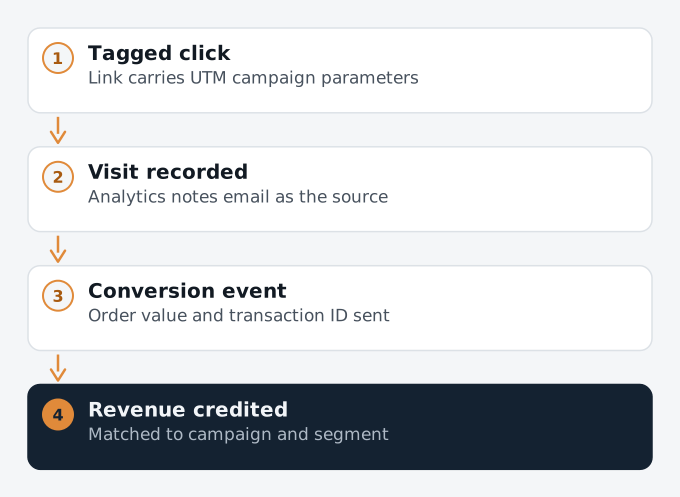
How a click in an email becomes revenue in your reports -
Set Up Conversion Tracking
Define your key conversion events (e.g., purchases, sign-ups, downloads) and set up conversion tracking in your web analytics platform. Include a unique transaction ID and the order value so conversions can be linked back to specific email campaigns. For example, a Google Analytics 4 purchase event:
gtag('event', 'purchase', { transaction_id: '12345', value: 99.99, currency: 'USD' }); -
Implement Attribution Modeling
Apply your chosen attribution model to assign conversion credit to email touchpoints. Use marketing attribution tools or build custom models to distribute revenue based on your preferred logic. Note that Google Analytics 4 attribution reports now offer only data-driven and last-click models, so first-touch, linear or time-decay views need another tool or your own analysis of exported data.
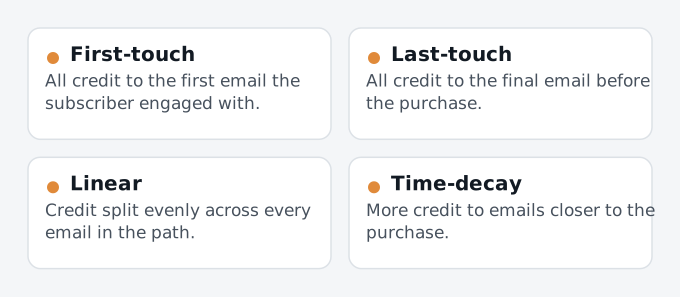
Four ways to share revenue credit between emails


Key Email Revenue Metrics to Track
With advanced tracking in place, you can measure a range of email revenue metrics to gain deeper insights into performance. Here are some key metrics to focus on:
Email-Attributed Revenue
Total revenue generated from email campaigns based on your attribution model. Measure overall email program effectiveness and ROI.
Revenue per Email (RPE)
Average revenue generated per delivered email. Useful for comparing the performance of different campaigns and segments.
RPE = Email-Attributed Revenue / Emails Delivered
Conversion Rate
Percentage of email recipients who completed a desired action, such as making a purchase. Track conversion rates at different funnel stages.
Conversion Rate = Conversions / Emails Delivered
Average Order Value (AOV)
Average revenue generated per converted email. Measure the purchasing behavior of email-driven customers.
AOV = Email-Attributed Revenue / Number of Orders
Advanced Email Segmentation for Revenue Optimization
Segmenting your email list based on subscriber behavior and revenue potential allows you to deliver targeted, revenue-driving campaigns. Consider these advanced segmentation strategies:
-
RFM Analysis
Segment subscribers based on Recency, Frequency, and Monetary value of their purchases. Identify high-value customers and tailor campaigns to their specific needs and preferences.
-
Engagement Levels
Group subscribers by their engagement levels (e.g., highly engaged, moderately engaged, disengaged) based on click, purchase and (with care, since privacy features inflate them) open behavior. Develop reactivation strategies for disengaged segments to boost revenue potential.
-
Customer Lifetime Value (CLV)
Segment subscribers based on their predicted CLV. Focus on nurturing high-value segments with personalized offers and exclusive benefits to maximize revenue over time.
CLV Segment Targeted Strategies High Personalized offers, exclusive benefits, VIP treatment Medium Cross-sell and upsell campaigns, loyalty programs Low Targeted promotions, educational content, referral incentives
Analyzing and Optimizing Email Revenue Performance
Regularly analyzing your email revenue metrics and conducting optimization tests are crucial for driving continuous improvement. Follow these best practices:
-
Set Benchmarks and Goals
Establish benchmarks for key email revenue metrics based mainly on your own historical performance. Set realistic goals for improvement and regularly measure progress against those targets.
Example Goal: Increase email-attributed revenue by 15% quarter-over-quarter. -
Conduct A/B Tests
Run controlled A/B tests on email elements like subject lines, content, offers, and CTAs to identify revenue-driving variations. Test one variable at a time and use statistically significant results to inform optimization decisions. Some example tests:
Test Variable Variant A Variant B Subject Line 20% Off Sale Exclusive Offer Inside Hero Image Product Photo Lifestyle Image CTA Text Shop Now Get Your Discount -
Leverage Predictive Analytics
Use predictive analytics and machine learning models to identify revenue opportunities, optimize send times, and deliver personalized content. Leverage historical data to predict future subscriber behavior and proactively target high-value segments.
Example: A predictive model identifies a segment of subscribers likely to make a high-value purchase in the next 30 days, triggering a personalized campaign with exclusive offers. -
Monitor and Adjust Attribution Models
Continuously monitor the effectiveness of your attribution models in accurately assigning revenue credit. Adjust models as needed based on changes in customer behavior, marketing mix, and business priorities.
Revisit your model whenever your marketing mix changes, for example when you add a new channel or change how often you email. Comparing two models side by side is a simple way to see how much your view of email's contribution depends on the model you choose.
Conclusion
Email revenue tracking works best when the basics are solid: consistent UTM parameters on every link, conversion events that carry order values, and an attribution model you understand and apply consistently. With that in place, metrics such as revenue per email, conversion rate and average order value show which campaigns and segments really pay off, and A/B tests tell you how to improve them. Rely on clicks and conversions rather than opens, review your numbers regularly, and treat any attribution model as a useful estimate rather than an exact truth.